Latest Radar GPS News & Updates
Welcome to the official Radar GPS News page from Lufop.net ️. Here you’ll find all the latest published articles: monthly radar updates, personalized alerts, mobile applications, POI tutorials, legal updates, and more. This page is regularly updated to provide you with reliable, useful, and up-to-date information for safer driving.
Lufop Evolves: New ODbL License, Continent-Based Files, and Expanded International Coverage

In recent days, several significant changes have been made to the data structure and download offerings on Lufop. Some are already visible, while others will be rolled out gradually across upcoming file generations.
The goal isn’t to alter what has defined Lufop since its inception: a community-driven database of speed cameras and danger zones, enriched through available data, automated processing, and—most importantly—user contributions. Instead, it’s about preparing for the future: better organizing a database that has grown significantly, facilitating its reuse, and offering more countries, all while continuing to focus efforts on regions where the Lufop community is most active.
Lufop Database Now Under ODbL 1.0 License
Previously, Lufop data was published under the Creative Commons CC BY-SA 4.0 license. The database is now licensed under the Open Database License (ODbL) 1.0, a license specifically designed for databases. It allows for sharing, using, modifying, and enriching the data, provided attribution rules are followed and, in some cases, share-alike conditions are met. This is the same license used by OpenStreetMap, making it more consistent with geographic data from this ecosystem.
I’ve written a detailed article explaining the reasons behind this change and its implications:
→ Why Lufop’s Database Transitioned from CC BY-SA 4.0 to ODbL 1.0
An important distinction remains:
- the ODbL license applies to the data;
- the API offerings govern the service used to access it: quotas, volumes, synchronization, multi-country calls, or server resources.
New Countries Now Appearing
The shift to ODbL makes it easier to integrate compatible open sources, including certain geographic data from OpenStreetMap. As a result, new countries are beginning to appear in the Lufop database. While this expanded coverage opens exciting possibilities, it doesn’t mean all countries will immediately have the same level of precision. For some, the available data serves primarily as a starting point, requiring further refinement, correction, and validation against real-world conditions.
France, Belgium, and Switzerland Remain Top Priorities
The international expansion of the database doesn’t change my priorities. France, Belgium, and Switzerland remain at the core of my work, alongside other European countries historically used by the Lufop community. These regions will continue to receive the bulk of my efforts in verification, correction, and enrichment. A high-quality database isn’t just about accumulating GPS coordinates—it’s about identifying radar types, lanes, municipalities, speed limits (when known), and, above all, incorporating feedback from users who actually travel these routes.
Automation speeds up the process. The community ensures accuracy.
Broader Coverage for Better Trip Planning

So why expand to more distant countries? Simply because we travel. You might use Lufop daily in France, then depart weeks later for Spain, Portugal, Croatia, Scandinavia, or even further. Having the ability to prepare files in advance allows you to load data directly into your GPS without relying entirely on mobile connectivity. Depending on the country, regions traveled, operators, or plans used, network coverage can be inconsistent. This preparation is especially valuable for long trips, road trips, campervan travel, or routes crossing multiple borders. The goal is to offer more countries when you need them temporarily, without diverting efforts from regions where Lufop has the most experience.
Expanded Coverage Doesn’t Mean Uniform Quality
Seeing a new country appear on Lufop doesn’t mean its data has already undergone 15 years of community verification. For some territories, we now have a first layer of information. This can be progressively enriched through:
- compatible open sources;
- automated processing;
- OpenStreetMap geographic data;
- APIs used by Lufop;
- user reports and corrections.
New contributions continue to undergo validation before publication.
I’d rather clearly indicate that a dataset still needs enrichment than imply that every region in the world already has the same level of coverage. This aligns with Lufop’s historical approach: starting with a base, validating it in the field, and improving it collectively.
Downloads Now Organized by Continent
The addition of new countries also raises questions about file sizes. To keep downloads consistent and compatible with the widest range of GPS devices, countries will now be grouped by continent. The first change will affect Europe. Starting with the next file generations, the Europe file will include only European countries. This organization will also apply to monthly files for non-VIP users. Other continents will be added progressively, with the structure refined based on usage and community feedback.
Why Not a Single Global File?
A massive file containing all countries would technically be possible, but not necessarily practical. GPS devices and embedded systems often impose strict limits:
- maximum number of importable POIs;
- maximum file size;
- number of accepted categories;
- brand- and generation-specific formats.
These constraints are particularly relevant for certain Mercedes embedded systems using GPX files. Adding more data to a single file risks creating a “world file” that some GPS devices simply can’t load. The organization must strike the right balance between country-specific files, European sets, continental groupings, and, if needed, intermediate zones.
The best file isn’t the one with the most data. It’s the one your GPS can actually use.
New Data Complements the Historical Database
The original Lufop database isn’t disappearing or being replaced by OpenStreetMap. New sources primarily serve to expand coverage for countries that were previously absent or underrepresented, and to enrich certain geographic details. When OpenStreetMap data is used, proper attribution to OpenStreetMap and its contributors must be maintained, in compliance with the ODbL license. The Lufop database remains the result of a gradual assembly of open data, technical processing, verification, and community contributions.
Lufop API Supports Multi-Country Coverage
For developers, GPS apps, and mapping projects, the API remains the most flexible way to access data:
→ Explore the Lufop API
It allows filtering data by country and offers multiple access tiers based on volume and needs. The Free tier is designed for testing and small volumes, currently focusing on France, Belgium, and Switzerland. Higher tiers provide access to more countries and features tailored for synchronization and larger volumes. The principle remains the same: the data is licensed under ODbL 1.0, while the chosen plan defines the technical resources for accessing it.
What’s Next? A Dedicated Space for Campervan Travelers?
This new geographic organization also opens another opportunity. I’m exploring the creation of a dedicated Lufop space for campervan travelers and itinerant adventurers. When crossing multiple regions or countries, speed cameras and danger zones aren’t the only useful points of interest to store in your GPS. This space could, for example, offer files including:
- campsites and overnight stops;
- useful services;
- suitable parking areas;
- other practical POIs for trip planning.
At this stage, nothing is set in stone. First, we need to identify real needs, legally reusable sources, verification methods, and GPS-compatible formats. If you travel regularly by campervan, your feedback on which POIs you’d like to download from Lufop before your trip is especially valuable.
What’s Changing in the Coming Months
Changes will roll out gradually. Upcoming steps include:
- full organization of countries by continent;
- adaptation of Europe files;
- progressive creation of files for other continents;
- enrichment of data for new countries;
- continued priority work on France, Belgium, and Switzerland;
- study of limitations specific to certain GPS devices;
- enhancement of multi-country API capabilities;
- exploration of a campervan-focused space.
Adjustments will likely be necessary. Your feedback will once again guide the next phases of development.
Broader Coverage, Same Spirit
Technically, this is a major change. But Lufop’s spirit remains unchanged. The database can now cover more countries while continuing to prioritize quality over quantity in regions where the community is most active. An open source can provide a starting point. An API can enrich a dataset. Automation can supplement it.
But it’s the users who, over time, transform a collection of coordinates into a database that’s genuinely useful on the road. This model has defined Lufop from the start—and it will continue to guide this new international expansion.
Safe travels to all, and thank you to everyone who continues to report, correct, test, and help evolve the database.
Lufop
Sources and Additional Information
Surprise! Peugeot Could Revive Its ICE-Powered GTIs
 Peugeot: Is the Return of ICE GTIs Really Possible?
 Peugeot: Is the Return of ICE GTIs Really Possible?
Peugeot has just revived its legendary GTI badge with the new E-208 GTI, but as an all-electric model.
However, the manufacturer no longer completely rules out the idea of offering GTIs again hybrid, or even ICE-powered.
⚡ The E-208 GTI: Ushering in a New Era
- The new E-208 GTI develops 281 hp and 345 Nm.
- It weighs approximately 1,535 kg and features a limited-slip differential.
- Its WLTP range reaches 375 km.
- It marks the return of the GTI badge after several years of absence, but in an all-electric form.
🔥 Peugeot Now Envisions Hybrid GTIs
Peugeot’s new boss, Alain Favey, does not rule out a future hybrid GTI.
When asked about this possibility, he replied that it «could be a hybrid».
Peugeot is indeed set to introduce new conventional hybrid powertrains soon,
in addition to the micro-hybrid and plug-in hybrid systems already offered.
🚗 A Future 308 Hybrid GTI?
The future 308 could be a particularly interesting candidate to receive this sporty treatment.
Its future STLA One platform, planned for several Peugeot models from segments B to D starting in 2027, will be multi-energy.
It could therefore theoretically accommodate internal combustion or hybrid powertrains powerful enough for a new GTI.
💰 The Major Hurdle: The Eco-Tax
This is where things get complicated.
Powerful small ICE or hybrid sports cars remain difficult to make financially attractive in France due to the eco-tax.
However, Peugeot doesn’t want a GTI simply meant to look good in the catalog.
Alain Favey insists on the need to offer a true sports car, capable of convincing enthusiasts of the genre.
🚫 No GTI SUVs
Peugeot also wants to preserve the historical DNA of the GTI badge.
The manufacturer currently rules out the idea of a GTI SUV, considering that this designation should remain associated with a small city car or a sporty compact.
⏳ Nothing Is Decided Yet
For now, there’s no official talk of the return of ICE GTIs.
The director acknowledges that the project interests him, but Peugeot has not yet found a viable solution.
Furthermore, no GTI model is among the seven new European models announced by the brand by 2030.
💬 Our Opinion
Peugeot is reviving the GTI badge with an electric car, while hinting at the possibility of a new generation of hybrid GTIs.
However, between the eco-tax, regulations, and profitability, the path to an ICE GTI is still very, very long..
Upcoming Developments on Lufop – Part 2
Following your extensive feedback, several trends have emerged quite clearly. Many of you have indicated that you would welcome regular support, while remaining committed to a crucial point: that the service remains freely accessible for those who do not wish or cannot participate. This is an important balance, and I fully share this vision.
Furthermore, a key element must also be highlighted: individuals who actively contribute to the speed camera database (additions, corrections, reports) directly participate in the site’s evolution. These contributors play an essential role in Lufop’s quality and will naturally be recognized for their involvement. It’s worth noting that they are very often also financial supporters, which further reinforces their importance in the site’s life.
A Simple and Balanced Model
To try and reconcile all this, here is the evolution I wish to implement:
👉 A €3 / month subscription
- Full access to the site and the VIP area
- Access to the latest updates
- More comfortable experience
- No commitment
- Cancel anytime
👉 One-time donations always possible
- Full access for 1 year:
- Access to VIP files
- Full access to the VIP area: https://lufop.net/espace-vip/
👉 A plan adapted for occasional use
Some of you use Lufop only once or twice a year (often before holidays).
For this, I will offer:
- 30-day file access for €5
The objective is simple: to allow you to leave with the latest updates without having to subscribe long-term if it’s not necessary.
Payments and Security
As today, all payments will go through recognized solutions: PayPal and Stripe.
Your banking information remains fully managed by these secure platforms, as before.
They are never stored on Lufop, even with a subscription, and I do not have access to them.
Concrete Benefits for VIP Members
In parallel, I have worked on several developments that will be offered to active VIP members via the VIP area:
- Removal of intrusive ads for VIPs.
- Simplified portal for quick access to your favorite files:

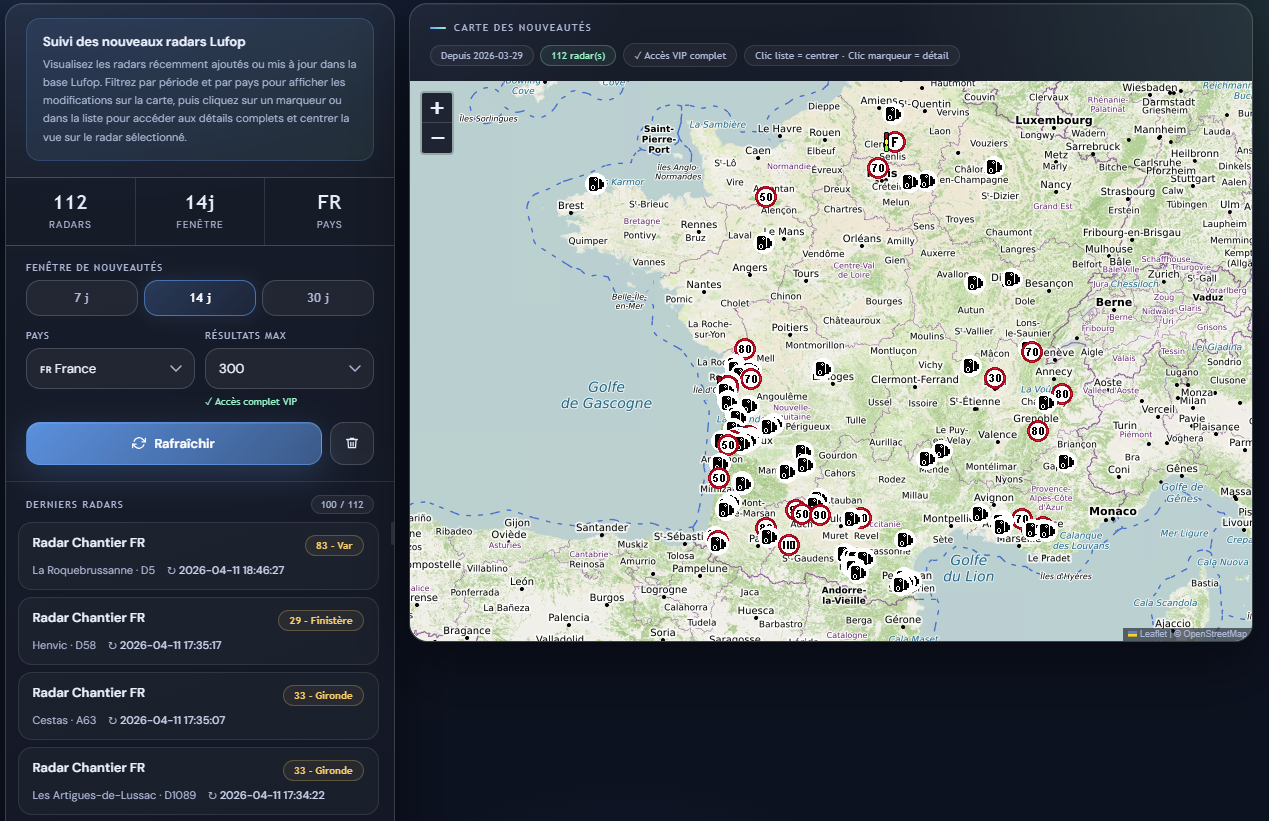
- Map dedicated to the latest added speed cameras (quick view of active zones)
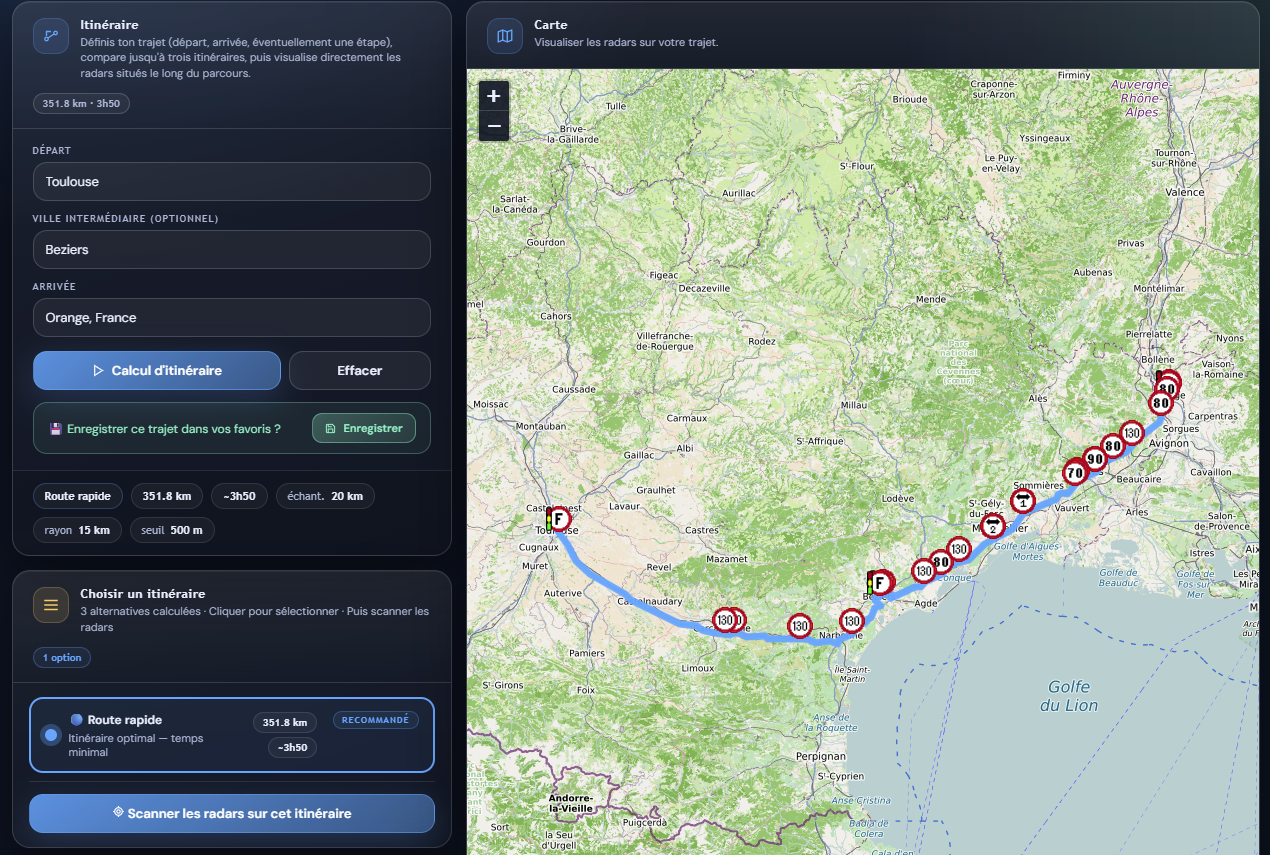
- Map allowing visualization of speed cameras encountered on a route
And coming soon:
- Personalized alerts when new speed cameras are added to your usual routes
The idea is to provide truly useful daily tools, not just a “status”.
I also want to develop partnerships, whether via the Lufop API, but also to allow certain companies to gain visibility through the Lufop website. If you know interested professionals, please spread the word…
In Conclusion
All of this will evolve gradually, but the objective remains the same since the beginning:
👉 Keep Lufop freely accessible
👉 Offer concrete benefits to those who wish to support the site
👉 Ensure a long-term viable model
I sincerely believe that this balance is the right one, and that it will allow Lufop to continue evolving while remaining true to its original spirit.
Thank you again to everyone for your trust, your loyalty… and for keeping this site alive daily.
Everything is detailed on this page I am finalizing, and here are the Badges on the forum:
 | Active Subscriber Monthly subscription at €3 active → Full Access |
 | Active Supporter Donation made less than 12 months ago → Full Access |
 | Super Contributor Active participation on the site (database, files, contributions…) → Full Access |
 | Contributor Has already made a donation to the site more than a year ago → Access to monthly files |
I will implement these changes gradually 🙂
To be continued…
São Miguel Azores Vacation: Nature, Volcanoes, and Crater Lakes
 Imagine a trip where nature reigns supreme, amidst dormant volcanoes, turquoise crater lakes, and soothing hot springs. São Miguel, the largest island in the Azores archipelago, is a destination preserved from mass tourism, ideal for an authentic vacation amidst breathtaking landscapes. With spectacular hikes and encounters with a warm culture, this Portuguese gem promises a refreshing and rejuvenating stay.
When to Visit São Miguel for an Ideal Vacation?
The Azores’ oceanic climate offers mild temperatures year-round, but the best time to visit São Miguel is from May to September. The summer months (June to August) are the sunniest, with temperatures ranging between 20°C and 25°C, perfect for exploring trails or swimming in crater lakes like Sete Cidades. Spring and autumn are also excellent for avoiding crowds while enjoying mild weather. Avoid the winter months if you plan to hike, as rains can be frequent.
Must-See and Must-Do Attractions in São Miguel
São Miguel is brimming with natural and cultural treasures. Here are the unmissable stops for a successful trip:
- Sete Cidades Lakes: An emblem of the island, these two twin lakes (Blue and Green) nestled in a volcanic crater offer a unique spectacle. Don’t miss the Miradouro da Boca do Inferno for breathtaking views.
- Furnas and its Hot Springs: This thermal village is famous for its hot springs, such as Lagoa das Furnas, where you can taste a cozido das Furnas, a stew cooked underground using volcanic heat.
- Fogo Volcano: A hike to the summit of this active volcano (last eruption in 1652) rewards you with panoramic views of the island and the ocean.
- Ponta Delgada: São Miguel’s colorful capital captivates with its Baroque architecture, fish market, and lively streets.
- Black Sand Beaches: Such as Praia de Santa Bárbara, ideal for surfing or relaxing by the Atlantic Ocean.

Average Budget for a Trip to São Miguel
The Azores remain an affordable destination compared to other European islands. Here’s an estimate for a couple’s trip (excluding airfare):
- Accommodation: Expect to pay between 60€ and 120€ per night for a comfortable hotel or guesthouse. Vacation rentals (like traditional houses) can cost between 80€ and 150€/night.
- Meals: A meal in a local restaurant costs between 10€ and 20€ per person. Specialties like cozido das Furnas or seafood are well worth trying.
- Transportation: Car rental (essential for exploring the island) ranges between 30€ and 50€ per day. Buses exist but are impractical for reaching isolated sites.
- Activities: Hikes are often free, but expect to pay 20€ to 40€ for organized excursions (whale watching, guided tours). Entry to hot springs like Terra Nostra Park costs around 8€.
Estimated total budget for one week (2 people): between 1,200€ and 1,800€.
Practical Tips for Your Trip to São Miguel
Transportation: Air travel is the only way to reach São Miguel (direct flights from Lisbon or Porto). Once there, renting a car is highly recommended to explore the island freely. Roads are well-maintained but winding: allow ample time for your journeys.
Accommodation: Book early, especially during high season (July-August), as accommodations are limited. Prioritize Ponta Delgada for its centrality or Furnas for a nature immersion.
Things to Avoid: Be wary of sudden weather changes (pack waterproof clothing) and avoid swimming in lakes without checking for currents. Finally, it is advisable to be vigilant on Portuguese roads and check speed control zones before driving during your vacation.
Good to Know: The currency is the Euro, Portuguese is the official language (but English is widely spoken), and no vaccinations are mandatory.
Ready to Go?
⚠️ Beware of Speed Cameras in Portugal: before hitting the road during your holidays, remember to update your GPS with the latest speed camera and danger zone information thanks to Lufop.net, to drive safely and avoid fines. You can also consult the map of automatic speed cameras in Portugal before you leave.
São Miguel in the Azores is a magical destination where <strong)preserved nature, volcanic landscapes, and local hospitality will leave you with unforgettable memories. Whether you’re a hiking enthusiast, a leisure seeker, or a foodie, this Portuguese island will captivate you. So, don’t wait any longer: pack your bags and let yourself be carried away by the adventure!
Porto Holidays: Discover Portugal’s Treasures of Wine and the Douro
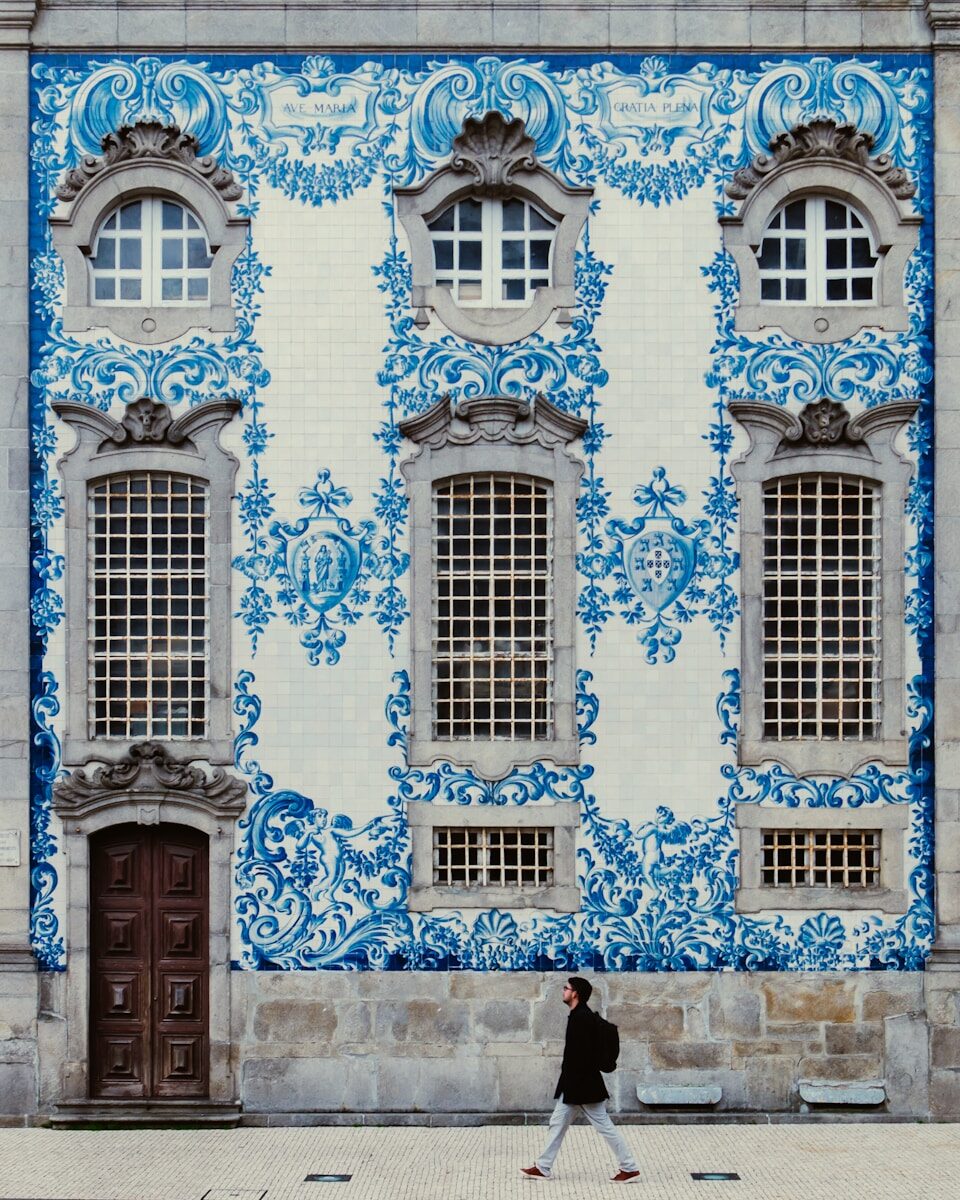 Porto, a jewel of northern Portugal, is a holiday destination that captivates with its enchanting blend of history, culture, and flavors. Between its typical cobbled streets, iconic bridges, and Port wine cellars, this city offers an unforgettable experience for authentic travel enthusiasts. Whether you’re drawn to its colorful architecture, its landscapes cradled by the Douro, or its generous gastronomy, Porto will amaze you at every turn.
When to Visit Porto for Your Holiday?
To fully enjoy your stay in Porto, favor the months from May to September. During this period, temperatures are pleasant (between 20°C and 30°C), ideal for exploring the city on foot or for a Douro River cruise. Summer (June to August) is more lively, with festivals and crowded terraces, but also more frequented by tourists. If you prefer to avoid the crowds, opt for spring or autumn: the climate remains mild, and the colors of the Douro vineyards in autumn are breathtaking.
Winter (December to February) is cooler and rainier, but perfect for those seeking tranquility and advantageous prices. The year-end festivities are particularly magical, with Christmas markets and sparkling lights.
Top Things to See and Do in Porto
Porto is full of unmissable sites for a memorable trip.
- Ribeira District: A UNESCO World Heritage site, this historic district is a maze of typical streets with colorful houses. Perfect for strolling, taking photos, or enjoying a coffee on a terrace with a view of the Douro.
- Dom Luís I Bridge: A symbol of the city, this metallic bridge designed by a disciple of Gustave Eiffel connects Porto to Vila Nova de Gaia. Cross it on foot to admire a breathtaking view of the city and the river.
- Port Wine Cellars: In Vila Nova de Gaia, don’t miss a Port wine tasting in one of the renowned cellars like Sandeman or Graham’s. A unique sensory experience!
- Livraria Lello: Considered one of the most beautiful bookstores in the world, its red staircase and stained-glass windows even inspired J.K. Rowling for Harry Potter.
- Douro Valley: Embark on a boat or train excursion along the river to discover the terraced vineyards and breathtaking UNESCO-listed landscapes.
- São Francisco Church: Its gilded Baroque interior is an architectural masterpiece that will leave you speechless.
Average Budget for a Porto Trip
Porto remains a relatively affordable destination compared to other European cities. Here’s an estimated cost for a comfortable trip (per person):
- Accommodation: Expect to pay between 60€ and 120€ per night for a well-located 3-4 star hotel. Youth hostels or rental apartments (Airbnb) can reduce this budget to 30-50€/night.
- Meals: A meal in a traditional restaurant costs between 10€ and 20€ (daily menu). For a gourmet dinner, plan for 30-50€. Don’t forget local specialties like francesinha (a hearty sandwich) or pastéis de nata!
- Transportation: The metro and buses are very economical (1-2€ per ride). A 24-hour pass costs around 7€. To explore the Douro Valley, expect 40-60€ for a cruise or an organized tour.
- Activities: Entrance to monuments varies between 5€ (church) and 15€ (Livraria Lello). A wine tasting starts at 10-15€.
Estimated total budget for one week (excluding airfare): 500-800€ per person.

Practical Tips for Your Porto Holiday
Transportation: Francisco Sá Carneiro Airport is located 15 km from the city center. The metro (line E) connects the airport to the center in 30 minutes for less than 2€. To get around the city, walking is often the best option due to short distances. Otherwise, opt for public transport or a taxi/ride-sharing service (Uber works well).
Accommodation: Book early if you are traveling during high season (June-September). Central districts like Baixa, Ribeira, or Clérigos are ideal for being in the heart of the action. For more tranquility, choose Foz do Douro.
To Avoid: Don’t venture without a reservation into the very touristy restaurants around Praça da Ribeira: prices there are often inflated.
Ready to Go?
⚠️ Beware of speed cameras in Portugal: before hitting the road during your holidays, remember to update your GPS with the latest speed cameras and danger zones thanks to Lufop.net, to drive peacefully and avoid fines. You can also consult the map of automatic speed cameras in Portugal before you leave.
Porto is a destination to be savored slowly, between strolls through its typical streets, Port wine tastings, and contemplation of architectural masterpieces. Whether you are a history buff, a gourmet, or simply looking for an escape by the Douro, this Portuguese city has everything to please. So don’t wait any longer: pack your bags and let yourself be charmed by the authentic soul of Porto!


 FRANCE
 Belgium
 ITALIE
 Germany
 SWITZERLAND
 SPAIN
SPAIN SWEDEN
 PORTUGAL
 NETHERLANDS
 LUXEMBOURG
 GREAT BRITAIN
 POLAND
 ANDORRA
 IRELAND
 LATVIA
 CZECH REPUBLIC
 BULGARIA
 NORWAY
 Finland
 Denmark
 Austria
 Lithuania
 Romania
 Croatia
 Estonia
 Cyprus
 Hungary
 Slovenia
 GREECE
 SLOVAKIA
 MOLDOVA
 Morocco
 EGYPT
EGYPT SOUTH AFRICA
 ALGERIA
 MAURITIUS
 ANGOLA
 CANADA
 United States
 Mexico
 Brazil
 Argentina
 Chile
Chile COLOMBIA
 ECUADOR
 United Arab Emirates
 Qatar
Qatar Singapore
 Philippines
 OMAN
OMAN India
India HONG KONG
 Taiwan
 China
China SOUTH KOREA
 New Zealand
 Australia